Building a Confluence RAG: Ask Natural-Language Questions of Your Wiki with LangChain, ChromaDB and Claude
Every team I’ve worked with has the same problem: a Confluence space full of useful knowledge that nobody can find when they need it. The search is fine for keywords you already know, but useless if you can’t guess the exact wording the author chose three years ago. What I actually want is to ask questions in plain English and get an answer — with links back to the source pages so I can verify it.
So I built one. It’s a small, self-contained Retrieval-Augmented Generation (RAG) system that indexes a Confluence space, stores the embeddings locally, and answers questions using Claude. The whole thing is two Python scripts, runs offline except for the Claude call, and costs nothing to operate beyond Anthropic API credits.
This post walks through how it works, the design choices I made, and the alternatives I considered.
What RAG actually solves
The naive approach to “ask questions of my wiki” is to paste everything into a prompt and let the LLM figure it out. That hits three walls fast:
- Context windows. Even Claude’s generous window can’t hold an entire Confluence space.
- Cost. Paying to re-send 100,000 tokens of wiki content with every question is ridiculous.
- Hallucination. Without explicit grounding, the model will cheerfully invent answers.
RAG solves all three by retrieving only the most relevant chunks for a given question and passing those — along with the question — to the LLM. The model answers based on what it was given, and you get source citations for free.
The Pipeline
Confluence pages
The source of truth - whatever pages live in the configured space.
↓
ConfluenceLoader
Fetches raw page content via the Confluence REST API.
↓
RecursiveCharacterTextSplitter
Breaks pages into overlapping chunks (1000 characters, 100-character overlap).
↓
HuggingFace Embeddings
Converts each chunk into a vector using all-MiniLM-L6-v2, which runs locally on CPU.
↓
ChromaDB
Stores the vectors on disk in ./chroma_db.
↓
(at query time)
↓
Retriever
Finds the top-3 most semantically similar chunks for the incoming question.
↓
Claude (Anthropic)
Reads the retrieved chunks as context and generates a grounded answer.
↓
Answer + Source URLs
Returned to the user, with links back to the original Confluence pages.
Two scripts do the work:
| Script | Purpose |
|---|---|
ingest.py | One-time (or refresh) job: fetches Confluence pages, chunks them, embeds them, and saves to ChromaDB |
query.py | Interactive or single-question querying against the saved index |
Ingest once, then query as often as you like. Re-running ingest.py appends new content; deleting ./chroma_db gives you a clean rebuild.
The Design Choices
LangChain as the glue
LangChain’s real value here isn’t any one feature — it’s that the ConfluenceLoader, RecursiveCharacterTextSplitter, Chroma vector store, HuggingFaceEmbeddings and ChatAnthropic chain all speak a common interface. That means swapping the LLM from Claude to GPT-4o is a single line change in .env, and swapping the vector store is roughly 10 lines. The retrieval pipeline expressed in LCEL (LangChain Expression Language) reads almost like pseudocode:
chain = (
    {"context": retriever | format_docs, "question": RunnablePassthrough()}
    | prompt
    | llm
    | StrOutputParser()
)
ChromaDB for local persistence
There are plenty of vector databases. For a project that indexes one or a few Confluence spaces — tens of thousands of chunks at most — you do not need Pinecone, Weaviate, or a Postgres cluster. ChromaDB writes to a folder on disk, has no server, no Docker, and no external account. The ./chroma_db directory can be zipped, copied, or backed up like any other data.
| Option | Trade-offs vs ChromaDB |
|---|---|
| Pinecone | Hosted, scales to billions of vectors, requires an account and API key. Overkill for a single-team space. |
| Weaviate | Feature-rich (hybrid search, GraphQL), but requires a Docker container or their cloud. More operational overhead. |
| pgvector | Keeps vectors inside PostgreSQL — good if you already run Postgres. Requires a database server. |
| FAISS | Facebook’s in-memory index, very fast. Does not persist to disk natively, less convenient for a reusable local index. |
Local embeddings with all-MiniLM-L6-v2
Embeddings need to capture semantic similarity — they do not need to generate language. That makes them a perfect job for a small local model. The HuggingFace all-MiniLM-L6-v2 model is ~80 MB, runs fast on CPU, requires no API key, and produces good-quality embeddings for English text.
The alternative would be a paid API — text-embedding-3-small from OpenAI, or Anthropic’s recommended Voyage AI. Both are higher quality but incur per-token cost on every ingest and query. For a corpus of a few thousand Confluence pages, MiniLM is indistinguishable in practice and entirely free.
Claude for the generation step
The LLM’s job in a RAG system is narrow: read the retrieved passages and answer from them, citing sources and declining gracefully when the answer isn’t there. Claude’s large context window, consistent instruction-following, and reliable citation behaviour make it well-suited. The system is designed so switching to OpenAI is a one-line flip of AI_PROVIDER=openai in .env.
The ConfluenceLoader
Part of langchain-community, this handles Confluence Cloud authentication, pagination, and HTML-to-Markdown conversion out of the box. Page metadata (title, URL) flows through as chunk metadata and becomes the source citations on every answer. No custom REST scraping required.
What a Query Looks Like
To show the end-to-end behaviour, here’s a tiny test Confluence space I set up with a page called Favorite Colours and Pet Names:
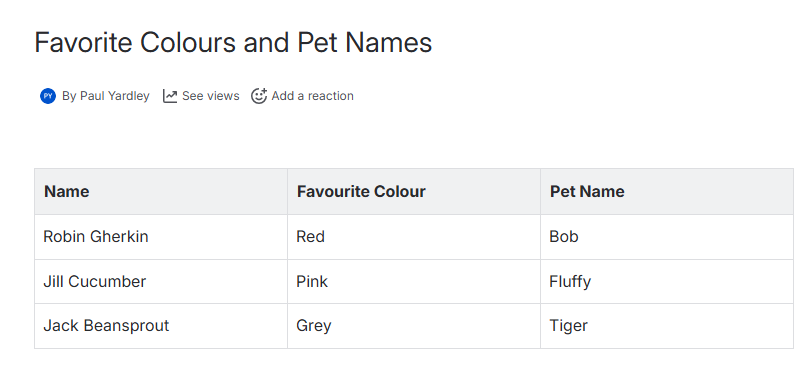 The source page in Confluence — three rows of trivia that nobody would ever remember.
After running python ingest.py once to index the space, I can ask a natural-language question directly from the command line:
python query.py "What is Robin Gherkin's favourite colour?"Warning: You are sending unauthenticated requests to the HF Hub. Please set a HF_TOKEN to enable higher rate limits and faster downloads.
Loading weights: 100%|█████████████████████████████████████████████████████████████| 103/103 [00:00<00:00, 5256.47it/s]
BertModel LOAD REPORT from: sentence-transformers/all-MiniLM-L6-v2
Key | Status | |
------------------------+------------+--+-
embeddings.position_ids | UNEXPECTED | |
Notes:
- UNEXPECTED: can be ignored when loading from different task/architecture; not ok if you expect identical arch.
Loaded ChromaDB with 5 chunk(s).
Answer:
Based on the provided documentation, **Robin Gherkin's favourite colour is Red**.
Sources:
- Test Space Test Page (https://pryardley-1771178931128.atlassian.net/wiki/spaces/TS/pages/16384001/Test+Space+Test+Page)
- Favorite Colours and Pet Names (https://pryardley-1771178931128.atlassian.net/wiki/spaces/TS/pages/16515073/Favorite+Colours+and+Pet+Names)
- Hello World (https://pryardley-1771178931128.atlassian.net/wiki/spaces/TS/pages/15990973/Hello+World)A few things worth noticing in that output:
- The first time you run it, the MiniLM weights are loaded locally — no API call, no token cost. The HuggingFace warning about
HF_TOKENand theUNEXPECTEDkey report are both benign; the model downloads anonymously and the unusedposition_idstensor is a known quirk of loading a Sentence-Transformers checkpoint with the base BERT architecture. - “Loaded ChromaDB with 5 chunk(s)” is the whole index. This space has only three tiny pages, so the entire corpus fits in five chunks. A real Confluence space will read hundreds or thousands here.
- The retriever pulled three candidate source pages but Claude correctly grounded its answer in the only one that actually contained the table (Favorite Colours and Pet Names). The other two are shown as retrieved sources, not cited ones — which is a useful honesty about how RAG works.
- The answer itself is one sentence, in bold, with a confident citation to the source. No hallucinated backstory for Robin Gherkin, no invented pet names — just what’s in the page.
Or you can run it interactively with no arguments and keep asking questions against the same loaded index:
python query.pyThe source links are the critical detail. They let you verify the answer in seconds — which matters, because even a well-grounded LLM occasionally summarises imperfectly. The links turn the tool from “trust me” into “here’s the receipt.”
Chunking: the Underrated Parameter
The single configuration choice that makes the biggest difference to answer quality is chunk size. Too small, and each chunk lacks context — the retriever pulls the right page but misses the surrounding explanation. Too large, and each chunk is diluted — the embedding averages multiple topics and the retriever loses precision.
I settled on 1000 characters with 100-character overlap — a common default that works well for prose-heavy wiki content. The overlap matters: a sentence split across two chunks without overlap can be retrieved incompletely. With overlap, the split sentence appears whole in at least one chunk.
For code-heavy documentation, smaller chunks (300–500 chars) often work better because code units are semantically tighter. For long-form strategy docs, larger chunks (1500–2000) preserve argument structure. If the quality of answers starts to degrade, chunking is the first thing to tune — not the LLM.
What I’d Add Next
The current system is deliberately small. Obvious extensions:
- Incremental re-indexing. Right now
ingest.pyappends; a--refreshflag that diffs by pageversionand re-embeds only changed pages would keep the index current without wasting compute. - Multi-space querying with filters. The ChromaDB metadata already carries the space key; exposing a
--spacefilter at query time would let you scope questions. - Hybrid search. Combining vector similarity with a lexical BM25 score often improves precision on named-entity queries (“the ACME project”) where semantic embeddings can wander.
- Evaluation harness. A small set of question-answer pairs with expected source pages, run on every chunking-parameter change, would turn “does this feel better?” into a number.
Key Takeaways
- RAG is the right pattern for a wiki. Context windows are big but not that big, and grounding with citations is how you turn an LLM from a demo into a tool you trust.
- Local embeddings are enough.
all-MiniLM-L6-v2on CPU produces retrieval quality comparable to paid APIs for typical wiki content, at zero cost. - ChromaDB is the right default. For anything short of “hundreds of thousands of documents across many teams,” a file-based vector store beats hosted alternatives on simplicity.
- Swap-ability matters. Designing the pipeline through LangChain’s interfaces means the LLM, embeddings, or vector store can be replaced independently — so the system can evolve with the ecosystem.
- Sources are not optional. An answer without a link is a guess. The most valuable part of this tool isn’t the answer — it’s the citation pointing back to the Confluence page.
Try It Yourself
The complete project is on GitHub: github.com/pyardley/ConfluenceRAG
git clone https://github.com/pyardley/ConfluenceRAG.git
cd ConfluenceRAG
pip install -r requirements.txt
cp .env.template .env         # then fill in Confluence + Anthropic credentials
python ingest.py              # index your space
python query.py               # ask questions
Point it at a Confluence space you know well, ask it something tricky, and check the sources. The speed of going from “I wonder if we documented this” to “yes, here’s the page” is the moment RAG stops being a buzzword and starts being a tool you actually use.