Static AI Review vs. Live Agentic Browsing: What 41 Seeded Bugs Actually Show
Exploratory testing is usually described as the thing automation can’t touch - it’s judgement, curiosity, following your nose through an application the way a script never would. I wanted to know if that’s still true, or if it’s a claim nobody had actually measured. So I built a proof of concept the only way that produces a real answer instead of an opinion: a deliberately buggy e-commerce app with 41 seeded defects and a hidden answer key, then two structurally different automated approaches to explore it, both scored against that same key by an independent adjudication pass that never saw either tool’s code.
The two approaches make opposite bets about what “exploratory” should mean for a machine. One captures a fixed evidence bundle first and only then lets an AI review it - fast, cheap, and reproducible, but never touching a live page. The other hands Claude a real browser through the Playwright MCP server and lets it click, type, and navigate like an actual tester - closer to the spirit of the word “exploratory,” and dramatically more expensive. This post covers how each was built, a representative bug each one catches, at least one bug each method missed that the other one caught, and an honest answer - grounded in the actual numbers, not a hot take - to whether any of this is good enough to call effective.
The Target: WidgetWorks, and Why an Answer Key Matters
The test subject is WidgetWorks, a small buggy widget-catalog site I built specifically for this: a home page, a catalog with search/sort/pagination, an item detail page, create/edit forms, an account page, and a contact page. Forty-one faults are seeded across it, organically embedded in real markup, CSS, and copy - never a giveaway filename or a comment reading <!-- BUG HERE -->. They’re mapped to the FEW HICCUPSS heuristic (Familiarity, Explainability, World, History, Image, Comparable products, Claims, User expectations, Purpose, Statutes/Standards) plus a CRUD checklist, and recorded in a separate answer-key/ directory that neither tool’s code path ever reads - enforced by a realpath check that hard-aborts if any configured input resolves under it.
Without a fixed answer key, “the AI found real bugs” is just an anecdote. With one, it’s a recall percentage, a false-positive count, and a fault-by-fault verdict you can audit line by line.
Approach 1: Capture Everything First, Then Review It
The default pipeline runs deterministic Playwright scanners against every page - screenshots, DOM snapshots, console/network logs, an axe-core accessibility pass, extracted text, plus scripted interaction probes (open every dropdown option, type into every search box, click every pagination control) and a full CRUD smoke flow that actually creates, edits, and deletes a tagged test record and diffs the before/after state. All of that gets written to disk as a fixed evidence bundle - and only then does an AI review phase begin, one claude -p call per page plus one cross-page synthesis call at the end.
The whole point of the architecture is that the AI phase is structurally incapable of browsing:
// exploratory-tester/src/ai/claudeClient.js
const args = [
  "-p",
  "--output-format", "json",
  "--json-schema", JSON.stringify(jsonSchema),
  "--tools", "Read",
  "--disallowedTools", "Bash,WebFetch,WebSearch,Write,Edit",
  "--strict-mcp-config", "--mcp-config", '{"mcpServers":{}}',
  "--add-dir", addDir,
  "--no-session-persistence",
  "--model", model,
  "--max-budget-usd", String(maxBudgetUsd),
];
--tools Read with an empty --mcp-config means the model can open the files already captured in addDir and nothing else. It can’t reload the page, it can’t click anything, it can’t check whether a bug is still there tomorrow. That’s a deliberate constraint, not a limitation I hit by accident: it’s what makes two runs against the same evidence bundle comparable, and it’s what keeps the AI phase cheap - a full run costs around $0.50 and takes a few minutes.
Approach 2: Give It a Real Browser and 6 Bounded Tasks
The second pipeline (bin/agentic-cli.js, kept in its own src/agentic/ module, never touching the default pipeline’s code) throws that constraint away on purpose. It’s the architecture option the README explicitly didn’t choose as the default - built anyway, to get real data on what “explore it like a human” actually costs and catches. Instead of a fixed evidence bundle, each of 6 bounded tasks gets its own live browser session through the real @playwright/mcp server:
// exploratory-tester/src/agentic/runAgenticSession.js
function buildMcpConfig(baseUrl) {
  const origin = new URL(baseUrl).origin;
  return JSON.stringify({
    mcpServers: {
      playwright: {
        command: "npx",
        args: ["@playwright/mcp@0.0.80", "--headless", "--isolated", "--allowed-origins", origin],
      },
    },
  });
}

const args = [
  "-p",
  "--output-format", "json",
  "--json-schema", JSON.stringify(schema),
  "--tools", "",
  "--strict-mcp-config", "--mcp-config", buildMcpConfig(baseUrl),
  "--permission-mode", "bypassPermissions",
  "--no-session-persistence",
  "--model", model,
  "--max-budget-usd", String(maxBudgetUsd),
];
Same claude -p mechanism, same JSON-schema-forced output, but --tools "" plus a live MCP server instead of --tools Read plus an empty one - that one-line diff is the entire architectural fork. The 6 tasks are deliberately phrased around activities, not fault IDs ("On the Catalog page: open the sort control and try each of its options... Try the pagination controls and see whether the visible items actually change"), because the agent must never be told what’s actually wrong - the whole test is whether it notices on its own, the same as a human tester would.
The cost difference is not subtle. A full agentic run costs $3.04 and takes ~23 minutes across the 6 tasks - roughly 6x the cost and 5-8x the wall-clock time of the static pipeline, for reasons the numbers make obvious: live browsing means the model reads a real accessibility snapshot after every action, retries failed navigations, and burns tokens narrating its own exploration instead of reviewing a pre-digested bundle.
Scoring Both: 71% vs. 57% Recall
Both runs went through the same comparison/ package - the only code in this project that ever reads answer-key/, and only after a tester run already exists independently. A separate adjudication LLM call compares the tool’s structured findings against all 41 faults and returns a per-fault verdict (FOUND / PARTIALLY_FOUND / MISSED) plus a false-positive list.
| Static pipeline | Agentic pipeline | |
|---|---|---|
| Recall (found + 0.5×partial) | 71% | 57% |
| False positives | 4 | 2 |
| Cost per run | ~$0.50 | $3.04 |
| Wall clock | a few minutes | ~23 minutes |
On raw numbers, the cheap, fast, constrained approach wins outright. But recall percentages hide the more useful question: is it the same 71% and 57%, or are these two methods good at different things? Cross-referencing the fault-by-fault verdicts (crediting a PARTIALLY_FOUND verdict as “caught,” the same way the recall percentages above do) answers that precisely, and the shape of the overlap is the real story:
18 + 12 + 7 + 4 = 41. Circle sizes are illustrative, not area-proportional - but the shape of the result is real: the two methods agree on more bugs (18) than either one uniquely contributes (12 and 7 combined), and only 4 of 41 stumped both.
A Bug Both Methods Catch - Because It Needs Meaning, Not a Rule
Before getting into where the two methods disagree, here’s one they both handle the same way, and why: WidgetWorks’ account page throws a raw, unhandled JavaScript error straight into the UI if you submit the form with an empty name field.
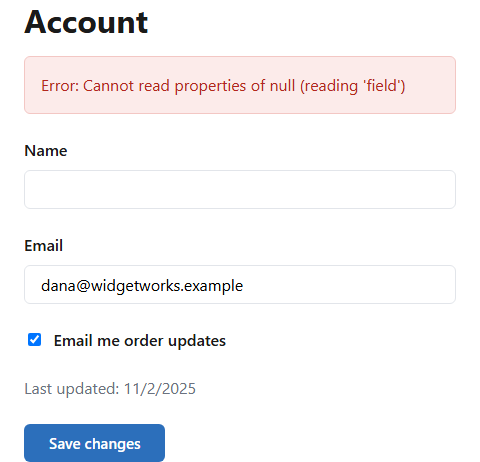
Cannot read properties of null (reading 'field') - exactly the kind of implementation detail that should never reach a user.
Nothing about this is a markup violation - the error text is valid, visible, readable HTML. Axe-core has no rule for “does this error message expose an internal exception” because that’s not a structural property; it’s a judgement about what the text means. Both the static AI review and the live agent caught it independently, in almost identical language, because both ultimately route the decision through the same kind of model doing the same kind of reading. This is the baseline: when a bug requires understanding content rather than checking a rule, either architecture that includes an LLM in the loop tends to get it. The interesting cases are the ones where the two architectures disagree.
Where Live Browsing Wins: Boundary Values Nobody Scripted
The static pipeline’s form-validation probe runs two fixed, scripted scenarios against every form: submit empty, and submit with a non-numeric value in a numeric-looking field. That catches a real class of bugs deterministically and cheaply. What it doesn’t do is try a value that’s syntactically valid but semantically absurd - like a negative price.
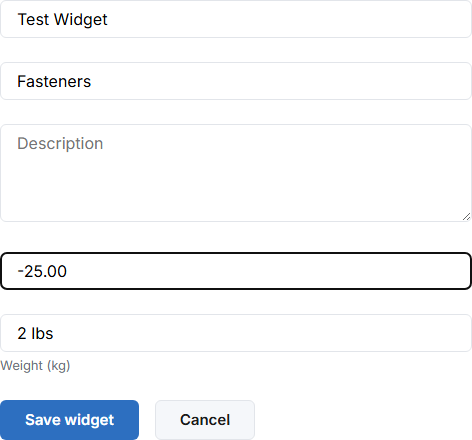 -25.00 sits in the price field with no validation feedback at all - a scenario the static pipeline’s two fixed probe cases never happen to try.
The static pipeline missed this fault (CRUD-01) entirely - it’s not in its two-scenario script, so nothing ever typed a negative number in. The live agentic run caught it on the first try, because one of its 6 bounded tasks was explicitly phrased as “create a widget using at least one unusual or boundary value for the price field (for example a negative number)… observe and report exactly what happens” - and an agent with a real browser just does that, the same way a curious human tester would try the obvious edge case without being told the exact input to use.
This pattern repeated across several of the static pipeline’s 11 total misses. Checking all 11 against the agentic run’s independent verdicts: 6 were fully caught by live browsing, and one more improved from a full miss to a partial catch. Each flip has the same shape - a specific action (submit a negative number, click Cancel and watch the network tab, cross-reference two numbers across two pages) that a fixed, enumerated probe set either didn’t anticipate or didn’t check the right follow-up property for, but that unscripted exploration naturally stumbled into.
Where the Static Pipeline Wins: Precision the Live Agent Never Thought to Check
The comparison runs the other way just as cleanly. WidgetWorks’ new-item.html form has its primary “Save widget” button hard-coded to #2D6FC0 via an inline style block, silently overriding the site’s actual brand token of #2C6FBB used everywhere else - including the “Add widget” button one click away on the catalog page.
 The catalog page’s “Add widget” button:
 #2C6FBB, the real brand-token color.
 One click away, the “Save widget” button:
 #2D6FC0 - a one-hex-step drift that’s genuinely almost imperceptible to the eye.
Look at those two side by side and the difference barely registers - which is exactly why this needs a computed-style diff, not a screenshot and a hopeful glance. The static pipeline’s deterministic visual-consistency scanner extracts the actual computed background color of every primary button and numerically compares it against the golden reference page’s token, so a one-hex-step drift is a hard, unambiguous fact regardless of how it looks to a human. The live agentic run missed this fault entirely, along with 11 others in the same shape (C-02, C-03, WCAG contrast checks, a double-submit race condition) - because the agentic architecture has no golden-reference comparison mechanism at all. It was never built to systematically diff every page’s computed styles against a baseline; it explores task by task, and nothing in its 6 tasks happened to prompt a pixel-level color check. No amount of “look more carefully” fixes a comparison the architecture was never designed to run.
What Neither Method Caught
Of the 41 seeded faults, only 4 were missed by both the static pipeline and the live agent. One of them is genuinely the most interesting result in the whole project:
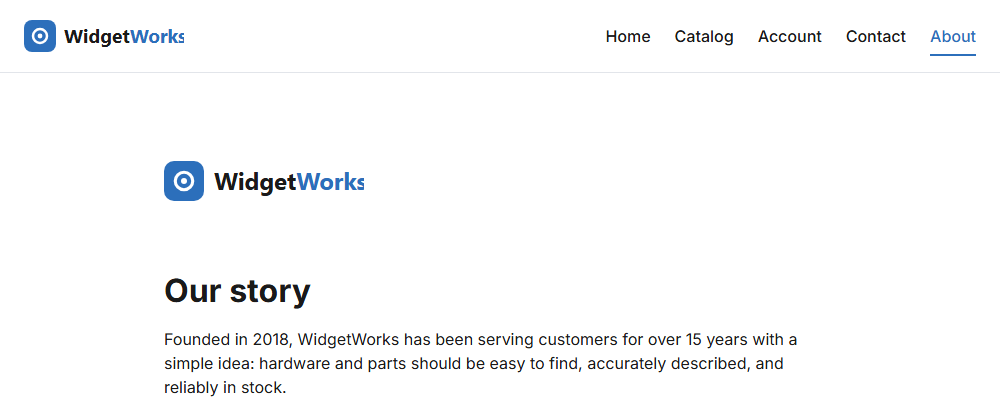 Same SVG, two renderings. The header uses its native 160×40 proportions; the body copy forces it into a 200×120 box - a real, measurable stretch neither AI ever flagged.
The logo’s SVG has a native viewBox="0 0 160 40" - a 4:1 rectangle. The header CSS renders it at height: 40px; width: auto, preserving that ratio exactly. The About page’s body copy renders the same file inside a 200px × 120px box with no object-fit correction, stretching it well outside its native proportions. Both the static AI review and the live agent had a full screenshot of this page in front of them, twice over across two separate runs, and neither one ever flagged it. That’s a real limitation of using a vision-capable model to eyeball proportion distortion from a screenshot - and it’s trivially fixable with a few lines of deterministic code that were simply never written: compute each <img>’s natural-vs-rendered aspect ratio and flag a mismatch past a small tolerance, the same way the visual-consistency scanner already flags button padding and border-radius drift.
The other two both-missed faults tell a more mundane story: F-03 (product cards with no hover feedback) went unflagged even though one of the agentic tasks explicitly instructed the model to check hover states - :hover is a transient CSS pseudo-class that doesn’t show up in an accessibility-tree snapshot the way a DOM change does, so even a direct instruction to look for it didn’t translate into actually catching it. And CRUD-03 - one specific catalog item that always 500s on its detail page - was missed simply because neither method’s limited sample of items (3 for the static CRUD smoke flow, whatever the agent happened to click) included that particular one. That last one is honestly the least interesting gap on the list: a time-boxed human tester given the same session length would have identical odds of never clicking that specific item out of 24+ in the catalog.
Two Real Blind Spots - Not a Vague One
Three of those four residual misses have a concrete, buildable automated fix. What’s left after removing those is narrower and more useful than “AI can’t do exploratory testing”:
Version-history awareness. A 41st fault was added after the fact specifically to test this: the golden reference page’s own brand color was silently regressed in a second git commit, so that every other page - correctly matching the original color - would get flagged as the one drifting. Neither pipeline caught it as intended, because neither has access to git history at all - only the live DOM of the current page. A human tester with institutional memory of “wait, didn’t this used to be a different blue?” catches this instantly. Nothing built here can, structurally, until something adds a version-control-aware scanner - a materially different kind of tool than either pipeline is.
Literal keyboard-driven interaction. One accessibility fault (a sort control built entirely from unsemantic <div>s with no ARIA, unreachable by keyboard) did get caught by the live agent - but by reading the DOM structure and inferring that it probably wasn’t keyboard-operable, not by actually pressing Tab and Enter and observing real focus behavior. No scanner or agent task anywhere in this project literally drives a keyboard. That inference happened to be right because the bug was structurally obvious. A subtler keyboard trap - a modal that doesn’t release focus, a custom control that responds to click but not Enter - would plausibly slip past every method here, the same way it’s well known industry-wide that automated accessibility scanners like axe-core only reliably catch a minority of real WCAG issues.
Challenges Along the Way
A few genuine debugging detours from building both pipelines, kept because they’re the kind of thing nobody writes down until they hit them:
Windows silently truncated the AI prompt. The per-page prompt is small, but the cross-page synthesis call embeds every per-page result and reliably exceeded Windows’ CreateProcess command-line length limit when passed as a -p <prompt> argument - the process would fail with “The command line is too long.” Piping the prompt over stdin instead fixed it permanently, and both claudeClient.js and runAgenticSession.js write to child.stdin rather than passing the prompt inline.
Git Bash quietly rewrote a Docker/CLI argument into a broken filesystem path. Any leading-slash argument passed to a program from Git Bash on Windows - --golden-path /index.html, or later docker run ... -w /workspace while setting up an external validation target - gets silently mangled into something like C:/Program Files/Git/index.html before the target program ever sees it, a classic MSYS path-conversion gotcha. It surfaced twice, months apart, in two completely unrelated contexts, and the fix is the same one-line prefix both times: MSYS_NO_PATHCONV=1.
Playwright’s own screenshot code produced a phantom bug report. page.screenshot() defaults to hiding the text cursor by injecting a temporary caret-color: transparent !important into every input on the page. A concurrent page.content() call in the original evidence-capture code caught that injected style mid-mutation and handed it to the AI review as if it were real site markup - which the model dutifully, and wrongly, reported as a serious sitewide accessibility defect. caret: "initial" on the screenshot call, plus never running DOM-reading and DOM-mutating operations concurrently, fixed it. Worth remembering: a test harness’s own instrumentation can accidentally forge evidence of a bug that was never there.
A test probe’s own naming convention defeated the probe. The CRUD smoke flow tags the synthetic record it creates so it can find it again later - originally with a "ZZZ-PROBE-" prefix, which reliably sorted the renamed test record to the end of an alphabetically-sorted catalog, often pushing it off the first page where the diff logic never looked. Switching the prefix to "AAA-PROBE-" sorts it to the front instead, where it stays visible - a one-character fix that turned a silently-failing check into a working one.
Is Automated Exploratory Testing Actually Effective?
Grounded in what the numbers actually show, rather than what would make a better headline: yes, meaningfully - not fully.
The single most transferable finding from this whole project didn’t come from comparing these two methods to each other; it came from comparing the static pipeline to an earlier, less-capable version of itself. The first version of the static pipeline - screenshots and DOM snapshots reviewed by AI, no interaction probes - scored 59% recall. Adding scripted interaction (actually clicking the sort dropdown and checking the result, actually toggling a checkbox and reloading to see if it stuck, actually double-clicking Save to check for a race condition) took it to 71%, without touching the AI layer at all. Most of what looks like it needs judgement turns out to just need something to click the thing and check what happened. That’s a bigger, more actionable finding than “AI can do exploratory testing” - it’s closer to “a large fraction of exploratory testing isn’t actually about judgement.”
Where judgement genuinely earns its cost is narrower and more specific than the industry pitch: understanding that “founded in 2018… serving customers for 15 years” doesn’t add up, that a keyword-stuffed alt text isn’t really a description, that two legal pages naming two different wrong companies as the data controller is a real contradiction rather than two separate typos. Both methods here found bugs like that independently - and both independently validated on completely unrelated, real-world sites this project didn’t build: the static pipeline found one of the most famous seeded bugs in Sauce Demo’s problem_user login (six different products rendering the identical placeholder photo) with zero prior knowledge of that app, and later found - and, checking the target’s own open-source code, confirmed the root cause of - a genuinely broken booking flow in a self-hosted instance of Mark Winteringham’s restful-booker-platform.
The honest caveat is that “meaningfully automatable” is doing real work in that sentence. Of 41 seeded faults, both methods together still missed 4, and even generously crediting every partial catch, neither method alone cleared three-quarters. The two genuine gaps that emerged - no version-history awareness, no literal keyboard-driven interaction testing - aren’t hand-wavy appeals to human intuition; they’re specific, buildable, currently-missing capabilities. If there’s a place in this pipeline that still needs a human, or a smarter piece of tooling that doesn’t exist yet in either of these two approaches, it’s there - not in a vague sense that “AI can’t really explore,” but in the two concrete places the data actually shows it can’t.
Key takeaways:
- A fixed evidence bundle and a live browser produce genuinely different, complementary miss patterns, not the same result at different price points. The static pipeline is precise but narrow - it catches everything its fixed probes anticipate and structurally cannot catch what they don’t. The live agent is broad but shallow - it tries the obvious boundary case nobody scripted, but skips the pixel-level diff nobody told it to run.
- Most of what looks like it needs AI judgement just needs something to actually perform the action and check the result. The single biggest recall improvement in this project (59%→71%) came entirely from scripting more interactions, not from a better prompt or a bigger model.
- A subtle-but-real bug is a stronger test of “does automation actually see this” than an obvious one. A one-hex-step color drift that’s nearly invisible to a human eye is exactly the kind of thing worth measuring numerically rather than trusting a screenshot review to catch - and exactly where the deterministic layer earns its keep over both AI approaches.
- Vision-capable models reading screenshots are not a substitute for computed geometry. Neither AI method here ever caught an aspect-ratio distortion that a few lines of
naturalWidth/naturalHeightmath would catch reliably and for free. - “Effective” and “complete” are different claims, and conflating them oversells the technology. This data supports automated exploratory testing as a genuine force multiplier that finds a real majority of defects cheaply - not as a replacement for a human tester, and the project’s own residual misses are the evidence for exactly where that line sits.
The Code
The full project - both pipelines, the seeded test app, the answer key, and every comparison report referenced above - is on GitHub: github.com/pyardley/exploratory-testing-poc. Files most relevant to this post:
exploratory-tester/src/ai/claudeClient.js- the static pipeline’s read-only, no-MCPclaude -pinvocationexploratory-tester/src/agentic/runAgenticSession.jsandprompts/agenticTask.md- the live agentic pipeline’s 6 bounded tasks and MCP-backed invocationexploratory-tester/src/scanners/interactionProbe.jsandcrudSmoke.js- the scripted interaction probes that drove the 59%→71% recall jumpanswer-key/fault-catalog.md- all 41 seeded faults with full technical detailcomparison/reports/2026-09-04T17-06-47-139Z-comparison-report.mdand2026-09-05T11-23-07-071Z-comparison-report.md- the full fault-by-fault verdicts for the static and agentic runs respectivelyFINDINGS.md- the complete writeup this post draws from, including the external-validation runs against Sauce Demo and Shady Meadows B&B