Building a Production-Grade Playwright Suite for Oracle APEX with PCOM and AI Agents
Testing Oracle APEX applications with Playwright is harder than it should be. APEX generates dynamic element IDs at runtime, fires AJAX partial page refreshes after almost every interaction, and uses ARIA roles that don’t map cleanly to what you’d expect from a standard web app. A test that works today breaks tomorrow when APEX regenerates a page and changes a selector.
My previous post covered using Playwright’s AI agents against a simple Todo app. This time I wanted to push them against something real: a demo Oracle APEX e-commerce portal called Sanzu, running in Oracle Cloud. The goal wasn’t just to produce passing tests - it was to produce tests that stay passing when APEX does what APEX does.
The answer turned out to be a combination of two things: a Page Component Object Model (PCOM) that insulates every test from the raw DOM, and the Playwright AI agent pipeline - planner, generator, healer - driven through Claude Code to build the whole thing.
The Target: Sanzu E-Commerce Portal
Sanzu is a demo Oracle APEX e-commerce application available from Built With APEX - the community showcase for APEX projects. It sells consumer electronics (phones, headphones, earbuds) and has the full set of e-commerce features you’d want to test: a product catalogue with a smart filter, authenticated cart management, a product detail page, and a checkout flow.
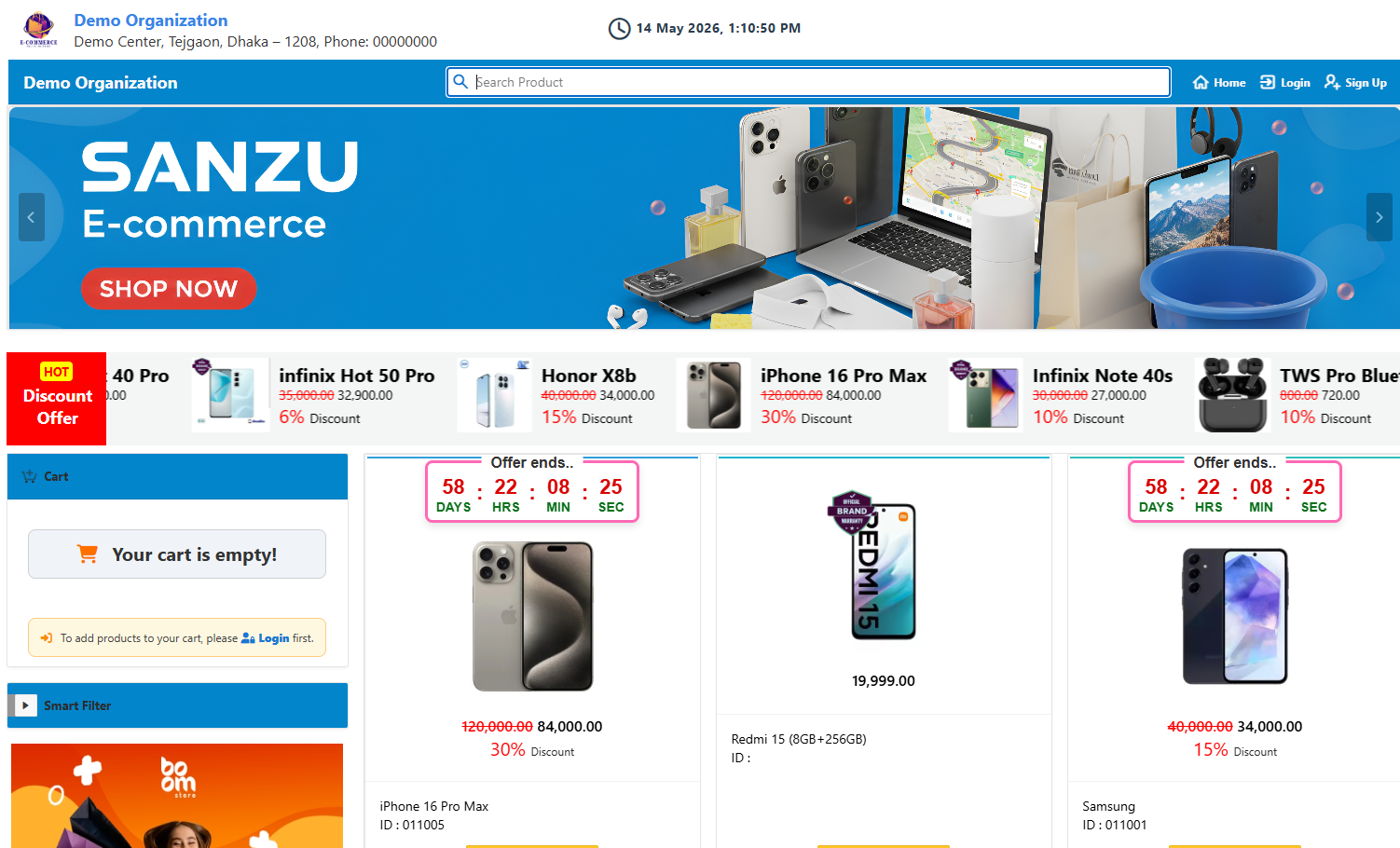 The Sanzu home page: 11 products, countdown timers on discounted cards, a sidebar cart widget, and a collapsible Smart Filter.
What makes it interesting from a testing perspective is everything APEX brings along for the ride:
- Dynamic IDs - form item IDs like
P1_ADD_PRODUCTare APEX conventions, not stable DOM anchors - AJAX region refreshes - clicking “Add to Cart” doesn’t navigate; it fires
apex.server.process()and refreshes a cart widget dynamically - Session-based auth - unauthenticated users are silently redirected to
/login_desktopwhen they touch the cart or search - Non-standard ARIA structure - the page header is a
<header>element withrole="banner", not a<nav>, and the cart is a sidebar<table>labelled “Cart Region”
Writing tests with raw page.locator() calls against any of these is a trap. One APEX version bump and you’re patching dozens of test files.
The Architecture: Page Component Object Model
Before touching the agents, I designed a four-layer PCOM that would act as a buffer between the tests and the unpredictable APEX DOM.
BasePage / BaseComponent     - shared APEX waits (waitForApexReady, networkidle)
         │
    components/              - one class per UI concern
    ├── HeaderComponent      - search box, login link, cart widget, user menu
    ├── ProductCardComponent - title, prices, Add to Cart, detail link
    ├── SmartFilterComponent - collapsible filter region
    ├── LoginFormComponent   - username/password, submit, error message
    └── CartSummaryComponent - totals, Checkout button
         │
      pages/                 - one class per APEX page alias
    ├── HomePage             - /home
    ├── LoginPage            - /login_desktop
    ├── CartPage             - /org-wise-cart-detail1
    ├── ProductDetailPage    - /product-detail-info
    └── CheckoutPage         - /checkout
         │
    fixtures/fixtures.ts     - Playwright test.extend, injects page objects
The key insight is that APEX locators are isolated in component classes. If APEX renames a button label, you change it in HeaderComponent.ts - every test that uses the header is automatically fixed. Without this layer, the AI healer would need to patch every individual test file; with it, one edit heals the suite.
Each page class inherits from BasePage which handles APEX-specific synchronisation:
protected async waitForApexReady(timeout = 20_000) {
  await this.page.waitForFunction(
    () =>
      typeof (globalThis as any).apex !== "undefined" &&
      (globalThis as any).apex.event !== undefined,
    { timeout },
  ).catch(() => {});
}
And the fixture layer means tests declare what they need and the framework navigates:
import { test, expect } from "../../fixtures/fixtures";

test("should add item to cart and update total", async ({
  homePage,
  cartPage,
}) => {
  await homePage.addFirstProductToCart();
  await homePage.header.goToCart();
  expect(await cartPage.getCartRowCount()).toBeGreaterThan(0);
});
No new HomePage(). No page.goto(). No raw locators. Just typed method calls against a stable API.
Setting Up the Agent Pipeline
With the PCOM scaffolded, I set up three Claude Code sub-agents under .claude/agents/:
playwright-test-planner.md- browses the live app and writes a structured test planplaywright-test-generator.md- reads the plan, executes each step in a real browser, and writes spec filesplaywright-test-healer.md- runs the suite, pauses at failures, inspects the DOM, and patches what’s broken
Each agent is invoked from the Claude Code CLI using a piped prompt file. The agents connect to the live APEX app via a Playwright MCP server configured in .mcp.json:
{
  "mcpServers": {
    "playwright-test": {
      "command": "cmd",
      "args": ["/c", "npx", "playwright", "run-test-mcp-server"]
    }
  }
}
One lesson learned the hard way: without .mcp.json in the project root, the agents have no browser tools. They’ll generate content from static analysis, claim success, and produce nothing on disk. Check for this file first.
Agent 1: The Planner - Mapping the APEX Application
The planner prompt gave the agent the confirmed APEX page aliases, the known UI structure from earlier manual exploration, and instructions to document everything in terms of PCOM method calls rather than raw selectors:
Get-Content .\specs\planner-prompt.txt -Raw | claude `
  --allowedTools "mcp__playwright-test__*,Glob,Grep,Read,LS" `
  -p "@playwright-test-planner Follow the instructions in the piped content"
What the Planner Found
The planner navigated the live app and discovered several things that weren’t obvious from the marketing description:
Guest users can’t do much. Clicking “Add to Cart” doesn’t trigger the APEX $s('P1_ADD_PRODUCT', N) JavaScript - it’s wrapped in an anchor tag that redirects to /login_desktop for unauthenticated users. Same with search: submitting the search form redirects guests to login before any results load. Both of these needed to become explicit test cases, not failures.
The “Discount Offer / HOT” strip is link-only. The prominent promotional strip at the top of the page contains product image links but no “Add to Cart” buttons. The planner correctly identified this as a separate UI region that deserved its own test (HP-02).
The countdown timer text is a CSS pseudo-element. The “Offer ends..” label that appears above each countdown widget is rendered via a ::before pseudo-element on .countdown-button - not a DOM text node. getByText('Offer ends..') finds nothing. The planner noted this; the healer later confirmed it and switched to .locator('.countdown').
The output was specs/sanzu.plan.md: 44 test cases across six areas, each with PCOM method references, APEX timing notes, and the exact output file path.
### 1 - Home Page         (HP-01 to HP-08)   8 cases
### 2 - Search/Filtering  (SF-01 to SF-08)   8 cases
### 3 - Authentication    (AUTH-01 to AUTH-06) 6 cases
### 4 - Product Detail    (PD-01 to PD-07)   7 cases
### 5 - Cart Management   (CART-01 to CART-08) 8 cases
### 6 - Checkout          (CHK-01 to CHK-07)  7 cases
Agent 2: The Generator - Writing Tests from the Plan
The generator’s job is to physically execute every step in the plan against the live browser, record the interactions, and write a typed TypeScript spec. One test case at a time, one generator_setup_page → execute → generator_read_log → generator_write_test cycle per case.
Get-Content .\specs\generator-prompt.txt -Raw | claude `
  --allowedTools "mcp__playwright-test__*,Glob,Grep,Read,LS" `
  -p "@playwright-test-generator Follow the piped instructions but generate Area 1 (Home Page) only"
PCOM Integration in the Generator Prompt
The generator prompt included explicit PCOM rules to prevent it from writing raw locators:
PCOM CONVENTIONS (mandatory):
- Import: import { test, expect } from '../../fixtures/fixtures';
- Never import from @playwright/test directly
- Never instantiate page classes (no new HomePage())
- Use fixture page objects as parameters: { homePage }, { cartPage }, etc.
- Access components via page objects: homePage.header, homePage.smartFilter
- The homePage fixture auto-navigates - do NOT call homePage.goto() again
What It Produced
For Area 1 (Home Page), the generator produced eight spec files matching the plan’s File: paths exactly. Each file contains one test.describe block with one test() - the format the generator agent is designed around.
Here’s HP-07, the test the planner flagged as “Add to Cart redirects guest to login”:
// spec: specs/sanzu.plan.md
// seed: seed.spec.ts

import { test, expect } from "../../fixtures/fixtures";

test.describe("1 - Home Page", () => {
  test("HP-07 - Add to Cart button redirects guest user to login", async ({
    homePage,
    page,
  }) => {
    // Step 1: Preconditions: guest. Navigate to /home via homePage fixture.
    await expect(page).toHaveTitle("Home");

    // Step 2: Click the first 'Add to Cart' button.
    // APEX note: button is wrapped in an anchor with a login redirect href.
    // Clicking triggers a dialog before redirect - handle it.
    page.once("dialog", (dialog) => dialog.dismiss());
    await homePage.addFirstProductToCart();

    // expect: Browser navigates to /login_desktop
    await expect(page).toHaveURL(/login_desktop/i);
  });
});
Notice the page.once('dialog', ...) line. The generator discovered this by actually clicking the button in the live app and observing that APEX fires an alert dialog before the redirect. This is exactly the kind of detail that manual test writing misses.
First Run: 8 Passed, 5 Failed
Running the home page tests immediately showed what needed healing:
✓  hp-02-discount-strip.spec.ts      HP-02 - Discount strip contains links only
✓  hp-04-star-ratings.spec.ts        HP-04 - Star ratings visible on product cards
✓  hp-05-header-guest.spec.ts        HP-05 - Header elements in guest state
✓  hp-06-cart-link-guest.spec.ts     HP-06 - Cart link redirects guest to login
✓  hp-07-add-to-cart-guest.spec.ts   HP-07 - Add to Cart redirects guest to login
✓  hp-08-product-detail-nav.spec.ts  HP-08 - Product image link navigates to detail
✘  home.spec.ts                      should display product cards with name and sale price
✘  hp-01-product-grid.spec.ts        HP-01 - Product grid renders all catalogue items
✘  hp-03-countdown-timers.spec.ts    HP-03 - Countdown timers on discounted cards
Three distinct failures, three distinct root causes.
Agent 3: The Healer - Diagnosing and Fixing
Get-Content .\specs\healer-prompt.txt -Raw | claude `
  --allowedTools "mcp__playwright-test__*,Glob,Grep,Read,LS,Edit,Write" `
  -p "@playwright-test-healer Follow the piped instructions but only heal the chromium-guest project"
The healer prompt contained an APEX-specific rule that was critical for this project:
Do not remove
waitForLoadState('networkidle')calls fromBasePage, page classes, or component classes. These are intentional APEX synchronisation guards, not timing hacks.
Without this instruction, a generic healer agent would strip the networkidle waits (following standard Playwright “best practices”) and immediately break cart and search tests that depend on APEX AJAX settling before assertions.
Failure 1: getSalePrice() Timeout
The error:
TimeoutError: locator.textContent: Timeout 15000ms exceeded.
Call log:
  - waiting for locator('[class*="price"]:not(del):not(s)').first()
The salePrice locator in ProductCardComponent assumed the sale price would be in an element with "price" in its class name. It isn’t. APEX renders the sale price as a text node adjacent to the <del> original price element - no class, no wrapper, just a sibling.
The healer’s fix used locator.evaluate() to walk the DOM:
async getSalePrice(): Promise<string> {
  const fast = await this.salePrice
    .textContent({ timeout: 2_000 })
    .catch(() => null);
  if (fast?.trim()) return fast.trim();

  return this.root.evaluate((li: HTMLElement) => {
    const del = li.querySelector("del, s");
    if (del) {
      const nextEl = del.nextElementSibling;
      if (nextEl && !/^(del|s)$/i.test(nextEl.tagName)) {
        const t = nextEl.textContent?.trim() ?? "";
        if (t && /\d/.test(t)) return t;
      }
      let node: Node | null = del.nextSibling;
      while (node) {
        const t = (node.textContent ?? "").trim();
        if (t && /\d/.test(t)) return t;
        node = node.nextSibling;
      }
    }
    // Products WITHOUT discount: price is in an h3 text node
    const h3 = li.querySelector("h3");
    if (h3) {
      const walker = document.createTreeWalker(h3, NodeFilter.SHOW_TEXT);
      let n: Node | null;
      while ((n = walker.nextNode())) {
        const t = (n.textContent ?? "").trim();
        if (t && /[\d,]+\.\d{2}/.test(t)) return t;
      }
    }
    return "";
  });
}
This fix lives in ProductCardComponent.ts. Every test that calls getSalePrice() - including tests yet to be generated - gets the fix for free.
Failure 2: Search Redirects Guests to Login
The error:
TimeoutError: locator.waitFor: Timeout 20000ms exceeded.
  - waiting for locator('ul').filter({ has: getByRole('button', { name: 'Add to Cart' }) }).first()
  - navigated to ".../login_desktop?session=107777444759649"
home.spec.ts had tests for keyword search that worked fine in isolation - but APEX requires authentication to submit the search form. Guest users are silently redirected before any results load.
This isn’t a locator bug. It’s a test assumption bug. The healer marked them with test.skip() and a comment explaining why:
// Search submits a page request that APEX requires authentication for - guests
// are redirected to login. Covered by authenticated search area specs (tests/search/).
test.skip("should filter products when searching by keyword", async ({
  homePage,
}) => {
  // ...
});
Failure 3: Countdown Timer Text is a CSS Pseudo-Element
The error:
Error: expect(locator).toBeVisible() failed
Locator: locator('ul').filter(...).first().getByText('Offer ends..')
Expected: visible
Error: element(s) not found
The “Offer ends..” text is rendered by a CSS ::before pseudo-element on .countdown-button. It doesn’t exist in the DOM and can’t be found by any text-based locator.
The fix was to target the CSS class directly:
// Before: getByText('Offer ends..') - targets a CSS pseudo-element, never found
await expect(productGrid.getByText("Offer ends..")).toBeVisible();

// After: target the countdown container by its class
await expect(productGrid.locator(".countdown").first()).toBeVisible();
After all three fixes, all 13 tests passed.
What PCOM Made Possible
Looking back at the three failures, something stands out: two of the three fixes landed in component files, not spec files.
The getSalePrice() fix went into ProductCardComponent.ts. The countdown CSS class fix went into hp-03-countdown-timers.spec.ts - but because the countdown timer locator was scoped to homePage.productGrid (a PCOM property), the healer could target it precisely without touching any other tests.
This is the practical value of PCOM for AI-assisted testing. The healer’s scope of change is naturally bounded. When APEX changes something, there’s one canonical place to fix it. The alternative - dozens of spec files each containing their own page.locator('.countdown') - would require the healer to find and patch every occurrence. Miss one and you have a partial fix that passes locally but fails in CI.
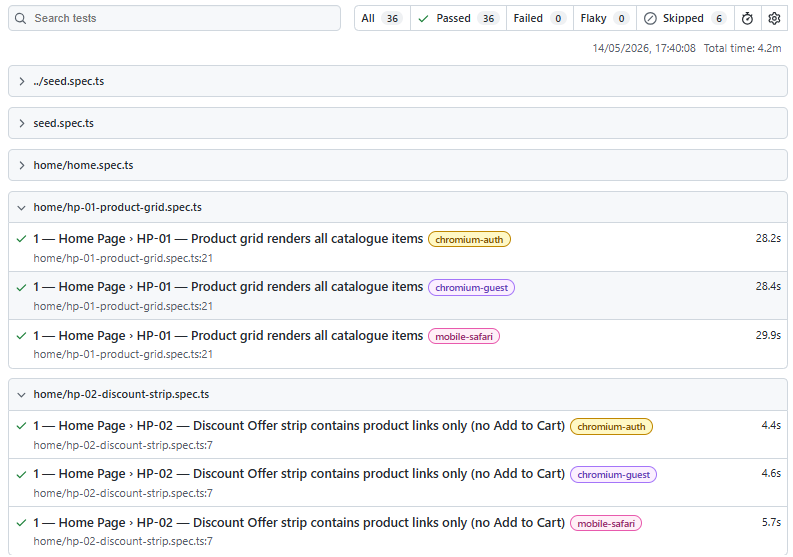 All 13 home page tests passing after the healer’s three targeted fixes.
The Authentication Challenge: Seed and Storage State
One thing the previous Todo app demo didn’t need was authentication. Sanzu does - and Oracle APEX’s session management adds some wrinkles.
The solution is a seed spec (seed.spec.ts) that runs as a Playwright setup project before any authenticated tests. It navigates to the login page, fills credentials from environment variables, and saves the resulting session to .auth/user.json using Playwright’s storageState mechanism.
The tricky part: APEX throttles repeated failed login attempts. If your test credentials are wrong and you’re retrying, you’ll get locked out and every subsequent auth test will fail with a “login blocked” message. The seed spec handles this with Promise.race() across three possible URL patterns - home (success), throttle notice, and invalid credentials - so it fails fast with a clear error rather than spinning until timeout.
const outcome = await Promise.race([
  page
    .waitForURL(/home|dashboard/i, { timeout: 30_000 })
    .then(() => "ok" as const),
  page
    .waitForURL(/notification_msg/i, { timeout: 30_000 })
    .then(() => "throttled" as const),
  page
    .waitForURL(/invalid|error/i, { timeout: 30_000 })
    .then(() => "badcreds" as const),
]).catch(() => "timeout" as const);
The playwright.config.ts wires this up so the chromium-auth project depends on setup:
{
  name: 'chromium-auth',
  use: { storageState: '.auth/user.json' },
  dependencies: ['setup'],
}
The Complete Pipeline
Here’s how the three agents work together in practice:
Step 1 - Plan (once per application or major feature area):
Get-Content .\specs\planner-prompt.txt -Raw | claude `
  --allowedTools "mcp__playwright-test__*,Glob,Grep,Read,LS" `
  -p "@playwright-test-planner Follow the instructions in the piped content"
Step 2 - Generate (one area at a time is practical for a 44-case plan):
Get-Content .\specs\generator-prompt.txt -Raw | claude `
  --allowedTools "mcp__playwright-test__*,Glob,Grep,Read,LS" `
  -p "@playwright-test-generator Follow the piped instructions but generate Area 3 (Authentication) only"
Step 3 - Heal (after each generation batch, or when CI goes red):
Get-Content .\specs\healer-prompt.txt -Raw | claude `
  --allowedTools "mcp__playwright-test__*,Glob,Grep,Read,LS,Edit,Write" `
  -p "@playwright-test-healer Follow the instructions in the piped content"
Each prompt file lives in specs/ and can be committed, reviewed, and evolved alongside the tests themselves. The prompts are part of the project, not just ephemeral chat messages.
Key Takeaways
-
PCOM isn’t optional for AI-assisted APEX testing - without it, the healer patches individual tests; with it, one component fix repairs the whole suite. The architecture makes self-healing actually scale.
-
The planner discovers things manual test writing misses - the APEX alert dialog before login redirect, the CSS pseudo-element countdown text, and the guest auth wall around search were all found by the planner exploring the live app, not by reading specs.
-
APEX-specific prompt rules matter - telling the healer not to remove
waitForLoadState('networkidle')saved a refactoring pass that would have broken authenticated tests. Agents follow general best practices unless you tell them about your specific constraints. -
Check
.mcp.jsonfirst - without the Playwright MCP server configured, agents have no browser access, generate content from static analysis, and claim success without writing a single file. It’s the first thing to verify before invoking any agent. -
The pipeline compounds - the planner’s APEX-aware test plan guides the generator to write correct tests first time, which gives the healer fewer failures to diagnose, which means cleaner fixes with smaller diffs. Each agent makes the next one’s job easier.
Try It Yourself
The full project is on GitHub: github.com/pyardley/playwright_PCOM_Apex
git clone https://github.com/pyardley/playwright_PCOM_Apex.git
cd playwright_PCOM_Apex
npm install
npx playwright install chromium

# Copy .env.example to .env and add your APEX credentials
# Then bootstrap the auth session:
npx playwright test --project=setup

# Run the home page tests
npx playwright test tests/home/ --project=chromium-guest

# Open the report
npx playwright show-report
To run the full agent pipeline yourself, follow the area-by-area commands in the README. The planner prompt, generator prompt, and healer prompt are all in specs/ - ready to pipe into Claude Code.
The Sanzu app itself is available to explore at builtwithapex.com - search for “Sanjay Sikder” or “ecommerceportal”. It’s a genuinely useful test target for anyone working with APEX: real authentication, real AJAX, real edge cases.