Using SQL EXCEPT to Detect Inserts, Updates and Deletes Between Two Tables
When you’re testing data migrations, ETL pipelines or any process that transforms one version of a table into another, a common question arises: “What exactly changed?” You need to know which rows were inserted, which were deleted and which were updated - ideally in a single, repeatable query.
In this post I’ll walk through a SQL pattern that uses EXCEPT and Common Table Expressions (CTEs) to produce a clean difference report between two tables with identical schemas.
The Scenario
Imagine you have two tables - CustomerOriginal (the baseline) and Customer (the current state after some process has run). Both share the same schema: CustomerID, Forename, Surname, UpdatedDateTime, AddressLine1, AddressLine2, and so on.
Here’s what the data looks like before and after:
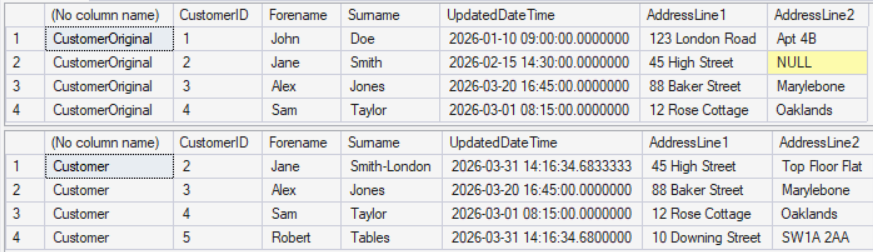
Looking at these two result sets, you can see differences - but manually cross-referencing them is tedious, error-prone and doesn’t scale. What we want is a single query that tells us precisely what changed.
The Query
WITH InsUpd AS
(
    SELECT * FROM Customer
    EXCEPT
    SELECT * FROM CustomerOriginal
),
DelUpd AS
(
    SELECT * FROM CustomerOriginal
    EXCEPT
    SELECT * FROM Customer
)

SELECT 'CHANGED FROM' AS [Action], DelUpd.*
FROM InsUpd
INNER JOIN DelUpd ON InsUpd.CustomerID = DelUpd.CustomerID

UNION ALL

SELECT 'CHANGED TO' AS [Action], InsUpd.*
FROM InsUpd
INNER JOIN DelUpd ON InsUpd.CustomerID = DelUpd.CustomerID

UNION ALL

SELECT 'DELETE' AS [Action], DelUpd.*
FROM DelUpd
LEFT JOIN InsUpd ON InsUpd.CustomerID = DelUpd.CustomerID
WHERE InsUpd.CustomerID IS NULL

UNION ALL

SELECT 'INSERT' AS [Action], InsUpd.*
FROM InsUpd
LEFT JOIN DelUpd ON InsUpd.CustomerID = DelUpd.CustomerID
WHERE DelUpd.CustomerID IS NULL

ORDER BY CustomerID, [Action];
And this is the output it produces:

Let’s break down exactly how this works.
How It Works
Step 1: Build Two Difference Sets with EXCEPT
The query begins with two CTEs that do all the heavy lifting:
WITH InsUpd AS
(
    SELECT * FROM Customer
    EXCEPT
    SELECT * FROM CustomerOriginal
)
EXCEPT returns rows from the first query that have no exact match in the second. So InsUpd contains every row in Customer that either doesn’t exist in CustomerOriginal at all (a new insert) or exists but has at least one column value that differs (an update).
DelUpd AS
(
    SELECT * FROM CustomerOriginal
    EXCEPT
    SELECT * FROM Customer
)
DelUpd is the reverse: rows in CustomerOriginal that have no exact match in Customer. These are rows that were either deleted entirely or had column values changed (the “before” side of an update).
The elegance of EXCEPT here is that it performs a full-row comparison without you having to enumerate every column. If any column differs, the row appears in the result set.
Step 2: Classify the Changes
With the two difference sets in hand, the main query uses a combination of INNER JOIN and LEFT JOIN to classify each row into one of four actions.
Updates (CHANGED FROM / CHANGED TO)
SELECT 'CHANGED FROM' AS [Action], DelUpd.*
FROM InsUpd
INNER JOIN DelUpd ON InsUpd.CustomerID = DelUpd.CustomerID

UNION ALL

SELECT 'CHANGED TO' AS [Action], InsUpd.*
FROM InsUpd
INNER JOIN DelUpd ON InsUpd.CustomerID = DelUpd.CustomerID
When a CustomerID appears in both InsUpd and DelUpd, the row existed before and still exists now - but with different values. The INNER JOIN finds these matches. The DelUpd row is the old version (“CHANGED FROM”) and the InsUpd row is the new version (“CHANGED TO”).
In our example, CustomerID 2 (Jane Smith) appears in both CTEs because her surname changed from “Smith” to “Smith-London” and her address changed. The output pairs these as CHANGED FROM and CHANGED TO rows.
Deletes
SELECT 'DELETE' AS [Action], DelUpd.*
FROM DelUpd
LEFT JOIN InsUpd ON InsUpd.CustomerID = DelUpd.CustomerID
WHERE InsUpd.CustomerID IS NULL
A row in DelUpd with no matching CustomerID in InsUpd means the row existed in the original table but is completely absent from the current table - it was deleted. The LEFT JOIN with a NULL check on the right side isolates these.
CustomerID 1 (John Doe) is in CustomerOriginal but not in Customer, so it appears as a DELETE.
Inserts
SELECT 'INSERT' AS [Action], InsUpd.*
FROM InsUpd
LEFT JOIN DelUpd ON InsUpd.CustomerID = DelUpd.CustomerID
WHERE DelUpd.CustomerID IS NULL
The mirror image: a row in InsUpd with no matching CustomerID in DelUpd is a brand new row that didn’t exist in the original - an insert.
CustomerID 5 (Robert Tables) appears only in Customer, so it’s flagged as an INSERT.
Step 3: Order the Results
ORDER BY CustomerID, [Action];Ordering by CustomerID then [Action] groups related changes together. For updated rows, “CHANGED FROM” sorts before “CHANGED TO”, making it easy to read the before-and-after pairs sequentially.
Why This Pattern Is Useful for Testing
This query has several properties that make it particularly valuable in a QA context:
- Schema-agnostic - because
EXCEPTcompares entire rows, you don’t need to write column-by-column comparison logic. Add a column to the table and the query still works without modification. - No false positives -
EXCEPTuses set-based comparison that correctly handlesNULLvalues (unlike=, which would missNULL-to-NULLmatches). - Self-documenting output - the
[Action]column makes the result set immediately readable without interpretation. - Repeatable - wrap it in a stored procedure or parameterised script and run it after every test execution to verify the expected changes occurred.
Considerations
- Primary key assumption - the
JOINconditions rely onCustomerIDbeing the primary key. For composite keys, extend the join to include all key columns. - EXCEPT eliminates duplicates - like
UNION,EXCEPTperforms an implicitDISTINCT. If your tables can contain duplicate rows, this may mask differences. In practice, tables with a primary key won’t have this issue. - Column order matters -
EXCEPTcompares columns positionally, so both tables must have the same column order and data types. UsingSELECT *ensures this when the schemas are identical, but explicit column lists are safer in production scripts. - Performance - on very large tables, the full-row comparison can be expensive. Consider filtering both sides of each CTE by a date range or partition key if you know the scope of changes.
Summary
The EXCEPT-based difference pattern is a clean, maintainable way to answer “what changed between these two tables?” with a single query. It classifies every difference into inserts, updates and deletes, requires no column-by-column logic and produces output that is immediately useful for test verification or data audit. It’s a technique I reach for regularly when testing database-level changes.