Building a Sequential Event Query to Verify Database State Across Multiple Tables
When you’re testing a system where customer data flows through multiple tables - history logs, status checks and a consolidated report - the hardest question isn’t “does the report look right?” It’s “can I prove it’s right by tracing every change that led to this state?”
In this post I’ll walk through a real testing problem I solved with a single SQL query that combines data from four different tables into one chronological timeline of events.
The Scenario
Picture a customer management system with the following structure:
- Customer - the live record for each customer (name, address, date of birth)
- CustomerHistory - an audit log populated by triggers on every INSERT, UPDATE, or DELETE to the Customer table
- CustomerAddressCheck - tracks the status of address verification (not started → initiated → passed/failed)
- CustomerIdentityCheck - tracks the status of identity verification, same pattern
- CustomerReport - a consolidated view that gets refreshed (via a stored procedure) whenever Customer data changes or a check status updates
The CustomerReport table is the one the business cares about. It combines the latest customer details with a derived status: the lowest of the address and identity check statuses. So if the address check passed (3) but the identity check failed (2), the report status is 2 - Failed.
The Testing Problem
After setting up test data - inserting customers, progressing their checks through various statuses, updating an address - I ended up with data spread across four tables, each with its own timestamp column and its own idea of what “happened” to CustomerID 1.
Here’s what the raw data looks like after the test setup completes:
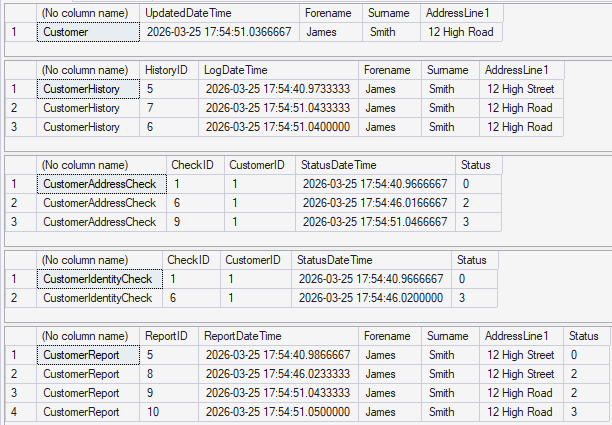
Looking at this, can you quickly tell me:
- In what order did things happen?
- When the address changed from “12 High Street” to “12 High Road”, did the report pick that up?
- Is the final report status correct given the check statuses?
You can answer those questions by mentally cross-referencing four result sets and their timestamps. But that’s slow, error-prone, doesn’t scale well and not something you’d want to do repeatedly across multiple customers or test runs.
The Solution: A Sequential Event Query
What I needed was a single, chronologically ordered view showing every meaningful change across all tables - with the previous and current values side by side.
The Approach
- Use CTEs (Common Table Expressions) to isolate each column from each table as its own change stream
- Use the
LAG()window function to compute the previous value for each column, partitioned by CustomerID and ordered by timestamp - Filter to only show rows where the value actually changed (or was set for the first time)
- UNION ALL the results from every CTE into one combined dataset
- ORDER BY LogDateTime to get a single chronological timeline
Walking Through the Query
The query starts with a variable for the customer we want to investigate:
DECLARE @CustomerID int = 1;Then each column from each source table gets its own CTE. Here’s the pattern for the Forename column from CustomerHistory:
WITH Forn AS
(SELECT
    CustomerID,
    LogDateTime,
    'CustomerHistory' AS TableName,
    'Forename' AS ColumnName,
    LAG(Forename) OVER (
        PARTITION BY CustomerID
        ORDER BY LogDateTime ASC
    ) AS PreviousValue,
    Forename AS CurrentValue
FROM CustomerHistory
WHERE CustomerID = @CustomerID
)
The LAG() function looks at the previous row’s value within the same partition (CustomerID) when ordered by time. For the first row, PreviousValue will be NULL - which is exactly what we want, since it tells us “this was the initial value.”
The same pattern repeats for every column: Surname, DateOfBirth, AddressLine1, AddressLine2, AddressLine3, and Postcode - across both CustomerHistory and CustomerReport.
Handling Status Columns
Status columns need special treatment because they store numeric IDs (0, 1, 2, 3) that aren’t meaningful on their own. The query uses a two-stage CTE pattern: first compute the raw previous/current values with LAG(), then join to the lookup table to get human-readable descriptions:
AddStat AS
(SELECT
    CustomerID,
    StatusDateTime AS LogDateTime,
    'CustomerAddressCheck' AS TableName,
    'Status' AS ColumnName,
    LAG([Status]) OVER (
        PARTITION BY CustomerID
        ORDER BY StatusDateTime ASC
    ) AS PreviousValue,
    [Status] as CurrentValue
FROM CustomerAddressCheck
WHERE CustomerID = @CustomerID
),
AddStatOutput AS
(SELECT
    CustomerID, LogDateTime, TableName, ColumnName,
    CONCAT(PreviousValue, ' - ', prev.StatusDescription) AS PreviousValue,
    CONCAT(CurrentValue,  ' - ', cur.StatusDescription)  AS CurrentValue
FROM AddStat
INNER JOIN CustomerAddressCheckStatus prev
    ON AddStat.PreviousValue = prev.StatusID
INNER JOIN CustomerAddressCheckStatus cur
    ON AddStat.CurrentValue = cur.StatusID
)
This gives us output like 0 - Address Check not started → 2 - Address Check Failed instead of just 0 → 2.
Combining Everything
Finally, all the CTEs are combined with UNION ALL, filtered to only show actual changes, and sorted chronologically:
SELECT * FROM Forn WHERE (CurrentValue != PreviousValue OR PreviousValue IS NULL)
UNION ALL
SELECT * FROM Surn WHERE (CurrentValue != PreviousValue OR PreviousValue IS NULL)
UNION ALL
SELECT * FROM Addr1 WHERE (CurrentValue != PreviousValue OR PreviousValue IS NULL)
UNION ALL
-- ... all other CTEs ...
UNION ALL
SELECT * FROM AddStatOutput WHERE (CurrentValue != PreviousValue OR PreviousValue IS NULL)
UNION ALL
SELECT * FROM IdentStatOutput WHERE (CurrentValue != PreviousValue OR PreviousValue IS NULL)
ORDER BY LogDateTime;
The Result
Running this query produces a single timeline for CustomerID 1:
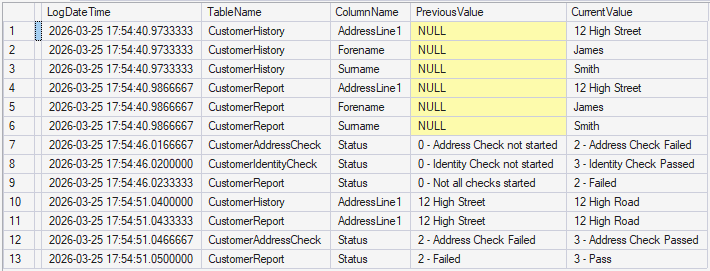
Now you can read the story of what happened to this customer from top to bottom:
- Row 1–3: Customer inserted - all fields set for the first time in
CustomerHistory(PreviousValue is NULL) - Row 4–6:
CustomerReportcreated with matching initial values and status 0 (Not all checks started) - Row 7: Address check moves from “not started” to “Failed” (status 0 → 2)
- Row 8: Identity check moves from “not started” to “Passed” (status 0 → 3)
- Row 9: Report refreshes - status becomes 2 (Failed), because at least one of the status checks has failed
- Row 10: Customer address updated from “12 High Street” to “12 High Road” in
CustomerHistory - Row 11:
CustomerReportpicks up the address change - Row 12: Address check now passes (status 2 → 3)
- Row 13: Report refreshes - status becomes 3 (Pass), because both address and identity checks have now passed
Every step is traceable. Every report state is explainable.
Why This Matters for Testing
This query transforms what would be a tedious manual comparison of four separate result sets into a single, readable audit trail. It’s useful for:
- Verifying trigger behaviour - have triggers fired correctly on every update?
- Validating report status logic - have the most recent address and identity statuses been used to calculate the report status?
- Regression testing - after schema changes, does the same sequence of operations produce the same timeline?
- Debugging failures - when a report looks wrong, this query tells you exactly where the data diverged from expectations
- Presenting results - easier to explain the sequence of events to stakeholders when trying to get sign-off.
Key SQL Techniques Used
| Technique | Purpose |
|---|---|
| CTEs | Break down a complex query into readable, named building blocks |
| LAG() window function | Compare each row to its predecessor without self-joins |
| UNION ALL | Combine heterogeneous change streams into one result set |
| CONCAT + JOIN on status tables | Produce human-readable output from numeric status codes |
| WHERE CurrentValue != PreviousValue OR PreviousValue IS NULL | Filter to only meaningful changes |
Takeaway
When you’re testing database logic that spans multiple tables and triggers, don’t just check the final state - build a query that shows you the journey. The LAG() window function and CTEs make it straightforward to construct a chronological, column-level diff across your entire data model. It turns “I think the report is correct” into “I can prove every value in the report matches what happened.”