Porting Demo Mode to Selenium: Chapter Cards, Highlights, and Building Video Recording From Scratch
I recently built a demo mode for a Playwright BDD suite: chapter title cards, element highlights, and per-scenario videos with the Examples-table values burned onto the card. The Ruby/Cucumber/Capybara/Selenium port of that same suite didn’t have any of it. Same Gherkin features, same application under test, no presentation layer.
Porting it turned out to be three easy wins and one real build. The title cards and highlights translate almost line-for-line - both ecosystems let you inject DOM through the driver and both have a page.execute_script-shaped escape hatch into the browser. The Examples-table field values actually got simpler in Ruby, for a reason specific to how Cucumber identifies a running scenario. And then there’s video: Playwright has video: 'on' built into the test runner. Selenium has nothing. That part had to be built from nothing, using ffmpeg and a Windows screen-capture trick that turned out to need less guesswork than I expected.
The Setup: Environment Variables, No Project Config
Playwright’s demo mode lives behind a dedicated demo project in playwright.config.ts plus a DEMO=true environment variable - the project controls which browser, the env var controls whether the visual extras render. Cucumber-Ruby has no equivalent of a “project”: there’s one runner, and browser selection already happens through environment variables (BROWSER=chrome, HEADLESS=false, MOBILE=true were already established conventions in this suite before any of this work started). Demo mode just adds two more to the same list:
$env:DEMO='true'; $env:DEMO_RECORD='true'; $env:HEADLESS='false'; bundle exec cucumber features/contact.featureDEMO=true turns on chapter cards and highlighting. DEMO_RECORD=true is a second, independent flag for video - opt-in on top of opt-in, because it pulls in an external ffmpeg dependency that plain highlighting doesn’t need. Someone who wants the visual walkthrough without installing ffmpeg can have it.
Part One: Title Cards, Same Trick
The mechanism is identical to Playwright: inject a fixed-position div that covers the viewport, let it sit for two seconds, remove it. Capybara’s page.execute_script is the same affordance as Playwright’s page.evaluate - whatever you inject into the page’s DOM gets rendered by the browser the same way the application’s own markup does:
def show_chapter_title(scenario)
return unless enabled?
feature_name = read_feature_name(scenario.location.file)
fields = read_example_fields(scenario.location.file, scenario.location.line)
.map { |k, v| [CGI.escapeHTML(k), CGI.escapeHTML(v)] }
page.execute_script(<<~JS, CGI.escapeHTML(feature_name), CGI.escapeHTML(scenario.name), fields)
const el = document.createElement('div');
el.id = '__demo-chapter';
el.style.cssText = [
'position:fixed;top:0;left:0;width:100%;height:100%;',
'background:#1a1a2e;color:#eee;z-index:2147483647;',
'display:flex;flex-direction:column;align-items:center;justify-content:center;',
'font-family:system-ui,sans-serif;text-align:center;padding:2rem;box-sizing:border-box;',
].join('');
el.innerHTML = `...`;
document.body.appendChild(el);
JS
sleep 2
page.execute_script("document.getElementById('__demo-chapter')?.remove();")
end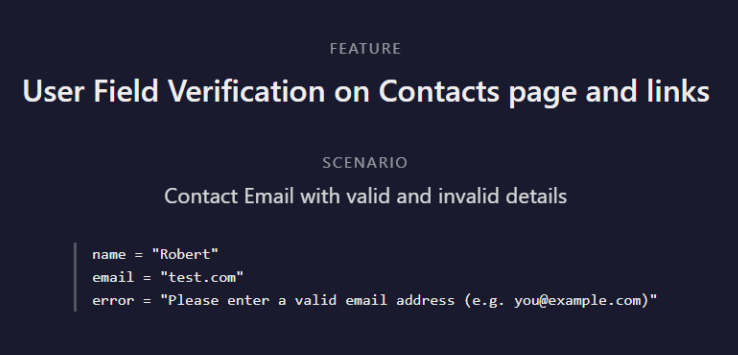 The Ruby version’s chapter card - same dark overlay, same
 z-index: 2147483647 ceiling, same monospace field list as the Playwright version.
Same z-index: 2147483647 ceiling. Same heredoc-as-template-literal approach to building the HTML. The colours and layout are deliberately copied pixel-for-pixel from the TypeScript version - there was no reason to redesign something that already worked.
The difference is in when it runs. Playwright’s version lives in an auto-use fixture - { auto: true } - that the test runner invokes before every test without any step file referencing it. Cucumber-Ruby doesn’t have fixtures in that sense; the equivalent cross-cutting hook is a Before block in features/support/hooks.rb, which already existed in this suite for resetting per-scenario state:
Before do |scenario|
  @field_context = nil
  @last_download = nil

  Dir.glob(File.join(DOWNLOAD_DIR, '*')).each { |f| File.delete(f) if File.file?(f) }

  if Demo.enabled?
    Video.start(scenario)
    show_chapter_title(scenario)
  end
end
Demo is mixed into Cucumber’s World object via World(Demo), so show_chapter_title is callable bare, the same way Capybara’s own page and fill_in are - no Demo. prefix needed inside a step or a hook. It’s a smaller mechanism than an auto-use fixture, but it lands in the same place: every step definition file is completely unaware demo mode exists.
Part Two: Highlights, Also Mostly the Same
highlight() is close enough to its Playwright counterpart that translating it was mechanical - two style presets, an inline style mutation, a pause, a cleanup:
STYLES = {
action: { outline: '3px solid #e63946', shadow: '0 0 0 6px rgba(230,57,70,.3)' },
verify: { outline: '3px solid #2a9d8f', shadow: '0 0 0 6px rgba(42,157,143,.3)' }
}.freeze
def highlight(element, type: :action, duration: 0.6)
return unless enabled?
style = STYLES.fetch(type)
page.execute_script(
"arguments[0].style.outline = arguments[1]; arguments[0].style.boxShadow = arguments[2];",
element, style[:outline], style[:shadow]
)
sleep duration
page.execute_script(
"arguments[0].style.outline = ''; arguments[0].style.boxShadow = '';",
element
)
end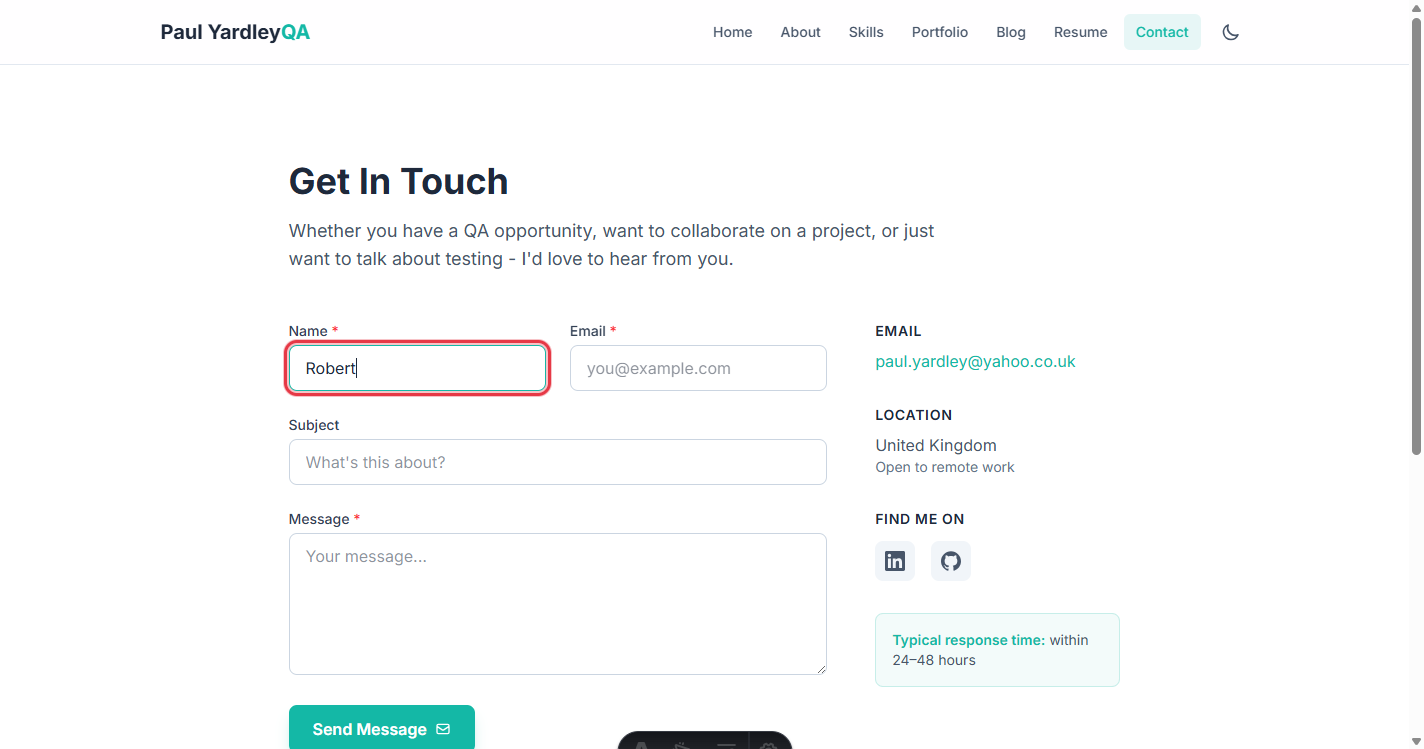 Red “action” highlight on the Name field - about to be filled.
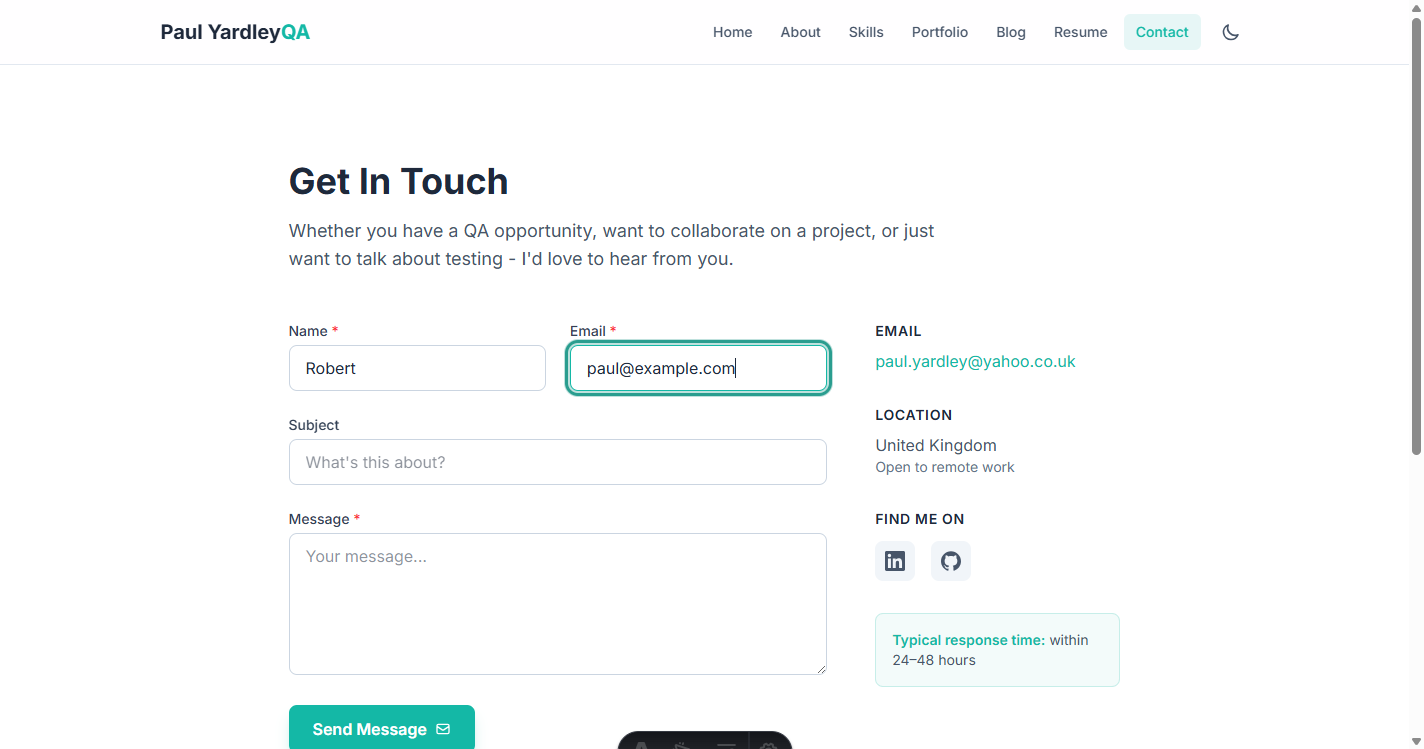 Teal “verify” highlight - the same colour convention as the Playwright version: red for “about to act”, teal for “about to check”.
Same colours, same convention, same no-op-when-disabled guard at the top so calls can sit in every step definition without affecting a normal CI run. The one structural difference: Capybara’s find_field/find(:link, ...) calls already return resolved Capybara::Node::Element objects, the same objects the step is about to call .click or pass to fill_in on. There’s no separate “locator vs. resolved element” distinction to manage, because Capybara doesn’t have Playwright’s lazy-locator abstraction - you just call highlight(find_field('Name')) and then act on the same variable.
Part Three: Named Example Values - Where Ruby Got Easier
This was the most involved part of the Playwright build, and it’s worth recapping why: playwright-bdd compiles .feature files into generated spec files, and by the time your step runs, the connection back to “which line of the Examples table produced this test” is buried inside an internal, undocumented fixture ($bddFileData) that needs an any-cast bridge to use from TypeScript at all. Getting the column names required a second step - reading the feature file directly and scanning backwards from a pickleLine number to find the nearest Examples: keyword.
Cucumber-Ruby doesn’t compile anything into intermediate files, and it turns out the information you need is already sitting in plain sight. Every running scenario carries a Cucumber::Core::Test::Location, and for a Scenario Outline row, scenario.location.line is the exact line number of that Examples row in the .feature file on disk - confirmed by printing it for features/contact.feature:33 and getting features/contact.feature:33:25 back (the 33 is the row, the 25 is the Outline declaration line, both kept so Cucumber’s own line-based filtering works either way you address it).
That single number is enough to derive everything the title card needs, with no internal API and no generated artifacts - just the same feature file Cucumber already parsed to run the scenario:
def read_example_fields(file, line)
  lines = File.readlines(file)
  row_line = lines[line - 1]
  return [] unless row_line && row_line.strip.start_with?('|')

  header_index = example_header_index(lines, line)
  parse_table_row(lines[header_index]).zip(parse_table_row(row_line))
end

def example_header_index(lines, line)
  header_index = line - 1
  header_index -= 1 while header_index > 0 && lines[header_index - 1].strip.start_with?('|')
  header_index
end
Walk upward from the data row while the line above is still part of a table (still starts with |); stop at the first line that isn’t, which is always the header row, because an Examples: keyword line breaks the chain. Zip the header cells against the data cells and you have [["name", "Robert"], ["email", "test.com"], ["error", "Please enter a valid email address..."]] - no fixture, no generated spec, no pickleLine arithmetic against a separate data structure. Plain Scenarios simply have a non-table line at that location, so the same function returns [] for them automatically.
The Cost: Writing a Gherkin-Aware Cell Splitter
The price of reading the table directly instead of through a library that’s already unescaped it is that you have to do the unescaping yourself. contact.feature has rows like:
| | ^(?:Please )?[Ff]ill (?:in\|out) this field\.?$ |A naive line.split('|') shears that cell into three pieces at the escaped \|. Gherkin’s table escaping is \| for a literal pipe, \\ for a literal backslash, \n for a newline, resolved left-to-right - so the parser has to walk character by character rather than split:
def parse_table_row(line)
  cells = []
  current = +''
  chars = line.strip.chars
  i = 0
  while i < chars.length
    ch = chars[i]
    if ch == '\\' && ['\\', '|', 'n'].include?(chars[i + 1])
      current << (chars[i + 1] == 'n' ? "\n" : chars[i + 1])
      i += 2
      next
    end
    if ch == '|'
      cells << current.strip
      current = +''
    else
      current << ch
    end
    i += 1
  end
  cells.shift if cells.first == ''
  cells
end
It’s a fair trade: Playwright’s version needs an undocumented internal fixture and a TypeScript escape hatch to get parameter values that are already unescaped; Ruby’s version needs forty lines of character-level parsing, but every input to it is a public, stable, documented part of Cucumber’s own model - the feature file on disk. Different complexity, moved to a different place.
Part Four: Video Recording - The Part Playwright Didn’t Make Me Build
This is the one piece with no Playwright equivalent to port, because Playwright doesn’t need it solved. video: 'on' in a project’s use block is the whole implementation - the browser context records itself, and the video file shows up as a result attachment when the test ends. Selenium WebDriver has no concept of video recording at all. The only way to get one is to record the screen from outside the browser, which means picking an OS-level capture tool and driving its entire lifecycle by hand.
On Windows, that tool is ffmpeg with its gdigrab input device. The naive way to point it at “the browser window” is to match by window title, which is exactly as fragile as it sounds - the title changes on every navigation, includes the page’s own <title>, and can match more than one window. The fix was to not use the title at all. Selenium’s WebDriver already exposes the browser window’s absolute screen position and outer size - the literal “window rect” from the WebDriver spec - and that’s precisely the rectangle gdigrab needs:
def self.start(scenario)
  return unless enabled?

  FileUtils.mkdir_p(VIDEO_DIR)
  tmp_path = File.join(VIDEO_DIR, "tmp_#{Time.now.to_i}_#{rand(1000)}.mp4")

  window = Capybara.current_session.driver.browser.manage.window
  pos = window.position
  size = window.size

  cmd = [
    'ffmpeg', '-y',
    '-f', 'gdigrab',
    '-framerate', '30',
    '-offset_x', pos.x.to_s,
    '-offset_y', pos.y.to_s,
    '-video_size', "#{size.width}x#{size.height}",
    '-i', 'desktop',
    '-pix_fmt', 'yuv420p',
    '-vcodec', 'libx264',
    '-preset', 'ultrafast',
    tmp_path
  ]

  stdin, _stdout, _stderr, wait_thr = Open3.popen3(*cmd)
  example_row = Demo.example_row_number(scenario.location.file, scenario.location.line)
  @io = { stdin: stdin, wait_thr: wait_thr, tmp_path: tmp_path, scenario_name: scenario.name, example_row: example_row }

  sleep 0.5
rescue Errno::ENOENT
  warn 'Demo mode: ffmpeg not found on PATH - video recording disabled for this run.'
  @disabled = true
  @io = nil
end
No title matching, no guessing at title-bar or border thickness - whatever coordinates Selenium reports are exactly what gets captured, because they describe the same window through the same OS APIs gdigrab itself reads. I checked this against the actual captured frame: a window configured to 1440x900 produced a video that probed at 1440x900, pixel for pixel, with no DPI-scaling offset on this machine.
Stopping is the part that needs care, because an mp4 isn’t safely playable until ffmpeg writes its final moov atom, which only happens on a clean shutdown - killing the process abruptly produces a corrupt file. ffmpeg’s documented clean-stop signal on a piped stdin is the literal character q:
def self.stop(_scenario)
  return unless @io

  io = @io
  @io = nil

  begin
    io[:stdin].puts('q')
    io[:stdin].close
  rescue IOError, Errno::EPIPE
  end

  unless io[:wait_thr].join(5)
    Process.kill('KILL', io[:wait_thr].pid)
  end

  safe_name = io[:scenario_name].gsub(/[^0-9A-Za-z.\-]/, '_')[0, 100]
  suffix = io[:example_row] ? "_Example#{io[:example_row]}" : ''
  final_path = File.join(VIDEO_DIR, "#{Time.now.strftime('%Y%m%d_%H%M%S')}_#{safe_name}#{suffix}.mp4")
  FileUtils.mv(io[:tmp_path], final_path) if File.exist?(io[:tmp_path])
rescue StandardError => e
  warn "Demo mode: failed to finalize video recording: #{e.message}"
end
Write "q\n", close the pipe, wait up to five seconds, force-kill only as a fallback. The whole lifecycle - start, stop, rename - is driven explicitly by Before/After hooks, which is the inverse of Playwright’s model: there, the runtime owns recording and you bolt a reporter onto the end of it (onTestEnd, fired once the result attachments confirm the file is closed); here, you own the recording, end to end, because nothing else will.
One side effect of owning the whole lifecycle: naming per-example videos got simpler too. Playwright’s reporter has to pattern-match a synthetic test title against /^Example\s*#?\d+$/i to detect an outline row, after the fact, from a string. The Ruby version already has the structural row number used for the title card (the same example_header_index walk from Part Three, exposed as Demo.example_row_number), so the filename gets an _Example2 suffix computed directly from the table position - no regex over a generated title required, because nothing generated the title in the first place.
reports/videos/
├── 20260618_114324_Contact_Email_with_valid_and_invalid_details_Example1.mp4
├── 20260618_114332_Contact_Email_with_valid_and_invalid_details_Example2.mp4
└── 20260618_114339_Contact_Message_with_valid_details_gets_sent.mp4
And because ffmpeg is a new dependency this suite didn’t previously have, the failure mode matters: if it’s not on PATH, Video.start catches Errno::ENOENT, logs one warning, and disables itself (@disabled = true) for the rest of the run rather than raising on every single scenario. It’s the same fail-soft shape as the screenshot-on-failure code already in hooks.rb - log and continue, never let an optional diagnostic feature take down the suite.
Challenges Along the Way
%w[] Doesn’t Mean What It Looks Like It Means
The first version of parse_table_row wrote its escape-character check as ['\\', '|', 'n'].include?(...), except I’d actually written it with Ruby’s word-array shorthand: %w[\\ | n].include?(...). That looks like three single-character strings. It isn’t - %w[\\ | n] evaluates to [" |", "n"], because backslash-space inside a %w literal escapes the space rather than producing a literal backslash token. The escaped-pipe regex row parsed into three cells instead of two, silently, with no error - just wrong output. Writing a small standalone script that called Demo.parse_table_row directly on a handful of real contact.feature rows caught it immediately; the fix was spelling the array out as ['\\', '|', 'n'] instead of reaching for the shorthand.
Verifying a Blocking, Two-Second Method Without Waiting Two Seconds Awkwardly
show_chapter_title calls sleep 2 in the middle of its own body - inject, wait, remove. Capybara’s save_screenshot is a normal synchronous WebDriver call, so taking a mid-card screenshot for this post meant running the chapter-title call on a background thread and screenshotting from the main thread while it slept:
t = Thread.new { Demo.show_chapter_title(scenario) }
sleep 0.6
page.save_screenshot('title-card-field-values.png')
t.join
No real concurrency risk - the background thread is parked in sleep for the entire window the screenshot call needs, so there’s never two WebDriver calls in flight at once. It’s a small trick, but a useful one for screenshotting (or testing) anything that’s “inject, pause, clean up” shaped.
Confirming Cucumber’s Location Behaviour Empirically Rather Than Trusting It
Before building read_example_fields around the assumption that scenario.location.line points at the Examples row, I checked it - a temporary warn "DEBUG location=#{scenario.location}" in the Before hook, one run against features/contact.feature:33, removed once confirmed. Cucumber’s own API documentation doesn’t spell this out explicitly for outline rows, and getting it wrong would have meant every example-field extraction silently pointing at the wrong table row. A two-line debug hook was cheaper than guessing.
Key Takeaways
The DOM-overlay trick for title cards is driver-agnostic. Both Playwright’s page.evaluate() and Capybara’s page.execute_script let you inject arbitrary HTML into the page, and both video-recording mechanisms (Playwright’s built-in recorder, ffmpeg screen capture) record whatever the browser actually renders - including your overlay. If your driver has a “run this JS in the page” method, it has everything needed for this part.
Where you can address “this exact test run” structurally beats parsing a generated title. Cucumber’s scenario.location.line pointing directly at an Examples row let the Ruby version skip an entire layer of work - internal fixtures, TypeScript escape hatches, regex matching against synthetic titles - that the Playwright version needed. When a framework gives you a structural handle on “which row is this,” prefer it over re-deriving the answer from a string.
Reading data straight from source files is more honest but pushes the parsing cost onto you. The Ruby version trades an undocumented internal API for forty lines of Gherkin-escape-aware parsing. Neither is free; the question is which kind of fragility you’d rather own - dependency-on-internals, or a hand-rolled parser you can test in isolation.
When a platform doesn’t give you a feature, you have to own its entire lifecycle yourself. Playwright manages video recording end-to-end; Selenium gives you nothing, so the Ruby version has to start the recorder, know how to stop it cleanly (the q-on-stdin convention, not a kill signal), and rename the result - all explicitly, all in your own hook code, with no runtime managing any of it for you.
Prefer the platform’s own coordinate system over guessing. gdigrab’s window-title matching is fragile by nature - titles change per page. Selenium’s WebDriver window rect (position/size) describes the same OS window through the same underlying APIs the capture tool reads, so reading it directly removed an entire class of potential mismatch, with no calibration step needed.
A quick empirical check beats trusting framework behaviour you haven’t seen confirmed. A single warn in a hook, run once, settled exactly what scenario.location.line means for an Examples row - cheaper than building a feature on an assumption and finding out it was wrong from a wrong field on a title card.
The Code
The Ruby/Cucumber/Selenium suite is on GitHub: github.com/pyardley/SelenuimWebdriver_Ruby
Relevant files for demo mode:
features/support/demo.rb-show_chapter_title(),highlight(), and the feature-file table parser (read_example_fields,example_row_number,parse_table_row)features/support/video.rb- the ffmpeg/gdigrablifecycle:start()andstop()features/support/hooks.rb- theBefore/Afterwiring
The original Playwright BDD suite this was ported from is also on GitHub: github.com/pyardley/playwright-bdd-suite, described in the earlier post on building its demo mode.